
i.MXRT118x signed flashloader example#
This is example how to create signed flashloader for i.MXRT118x device with EdgeLock firmware included. The aim of this Jupyter notebook is show how to easily create AHAB container with flashloader application from NXP SDK to be loaded with serial downloader mode. The process could be split to several steps.
1. Compile the flashloader application#
As a first step is needed to compile flashloader application itself from NXP SDK. - Download the NXP MCUXpresso SDK from NXP web site (https://mcuxpresso.nxp.com/) - Open the flashloader application in your favorite IDE. (Regular path to application: {SDK_root}\boards\evkmimxrt1180\bootloader_examples\flashloader\cm33) - Compile the flashloader and generate the binary output (In our example we use precompiled flashloader_cm33_exe.bin)
2. Prepare the AHAB configuration file#
Run this code to initialize members for this example…
%run ../../init_notebook.ipynb

import os
import pprint

pp = pprint.PrettyPrinter(indent=4)

WORKSPACE = "workspace/"  # change this to path to your workspace
VERBOSITY = (
    "-v"  # verbosity of commands, might be -v or -vv for debug or blank for no additional info
)

TEMPLATE_FILE = WORKSPACE + "ahab_template.yaml"  # AHAB configuration template file
BIMG_TEMPLATES_PATH = WORKSPACE + "bootable_image_templates"  # Bootable image templates folder
FLSHLDR_EXE_PATH = (
    "inputs/flashloader_cm33_exe.bin"  # Input compiled flashloader executable in binary format
)
AHAB_CONFIG = "inputs/flashloader_cm33_cfg.yaml"  # Prepared AHAB configuration file
AHAB_FILE = (
    WORKSPACE + "flashloader_cm33_ahab.bin"
)  # File name of created signed AHAB container with flashloader and EdgeLockEnclave firmware
BOOTIMG_CONFIG = (
    "inputs/bootimg_rt118x_serial_downloader.yaml"  # Prepared Bootable image configuration file
)
FLASHLOADER = WORKSPACE + "flashloader.bin"  # Final Bootable flashloader
env: JUPYTER_SPSDK=1
Created `%!` as an alias for `%execute`.
To get all supported sub commands of AHAB support call help.
%! nxpimage ahab
nxpimage ahab
Usage: nxpimage ahab [OPTIONS] COMMAND [ARGS]...

  Group of sub-commands related to AHAB.

Options:
  --help  Show this message and exit.

Commands:
  certificate     Group of sub-commands related to AHAB certificate blob.
  export          Generate AHAB Image from YAML/JSON configuration.
  get-families    Shows the full family info for commands in this group.
  get-template    Create template of configuration in YAML format.
  parse           Parse AHAB Image into YAML configuration and binary...
  re-sign         Re-sign the container in AHAB image.
  update-keyblob  Update keyblob in AHAB image container.
  verify          Verify AHAB Image.
As a good starting point it could be creation of AHAB configuration YAML file template#
# Create template AHAB configuration file using nxpimage
%! nxpimage $VERBOSITY ahab get-template -f mimxrt1189 -o $TEMPLATE_FILE --force

assert os.path.exists(TEMPLATE_FILE)
nxpimage -v ahab get-template -f mimxrt1189 -o workspace/ahab_template.yaml --force
Creating workspace/ahab_template.yaml template file.
Modify the template to configuration file used to create AHAB flashloader as a serial downloader mode#
Change the Target memory to serial downloader

Change the output file name

Define the path to the EdgeLock Enclave Firmware container (And clean up the comments about possible options of container definitions)

Add to list of containers the Flashloader container definition

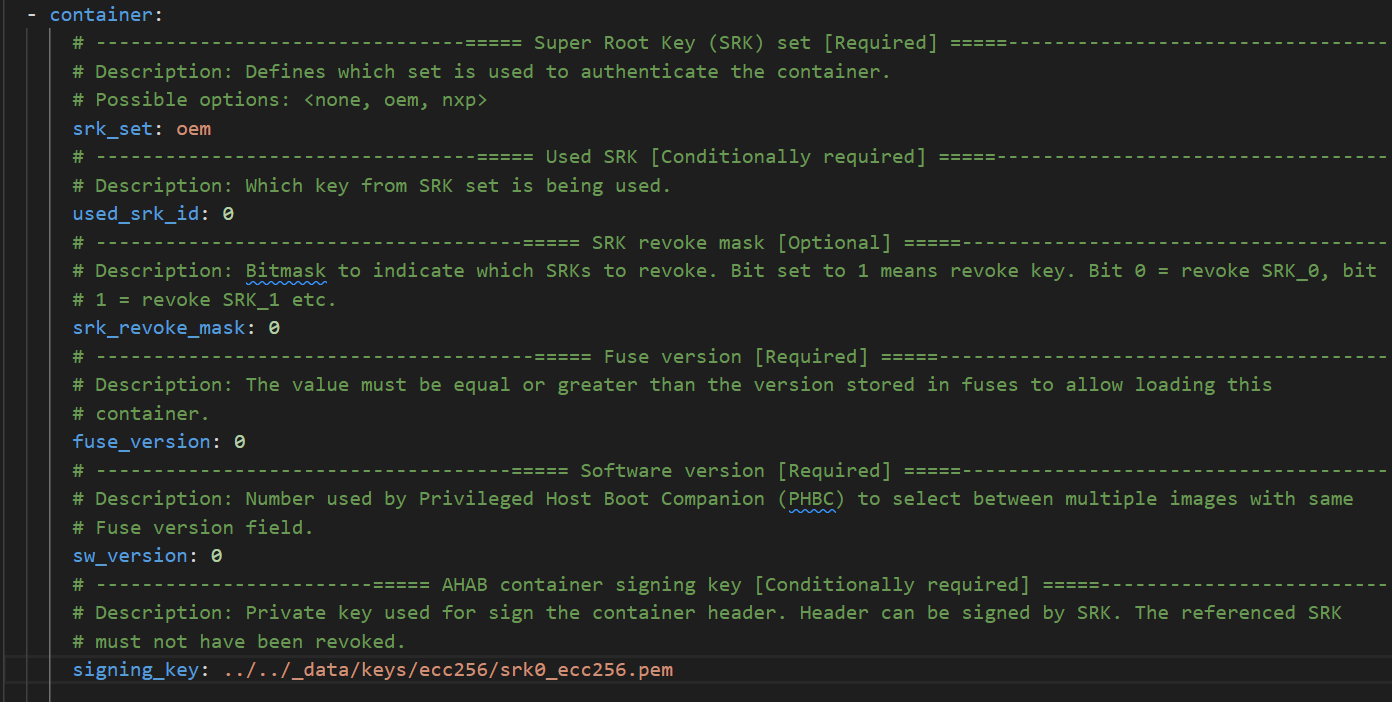
Define the general definition of Flashloader container. In our example the signature provider definition is removed and the local private signing key is defined
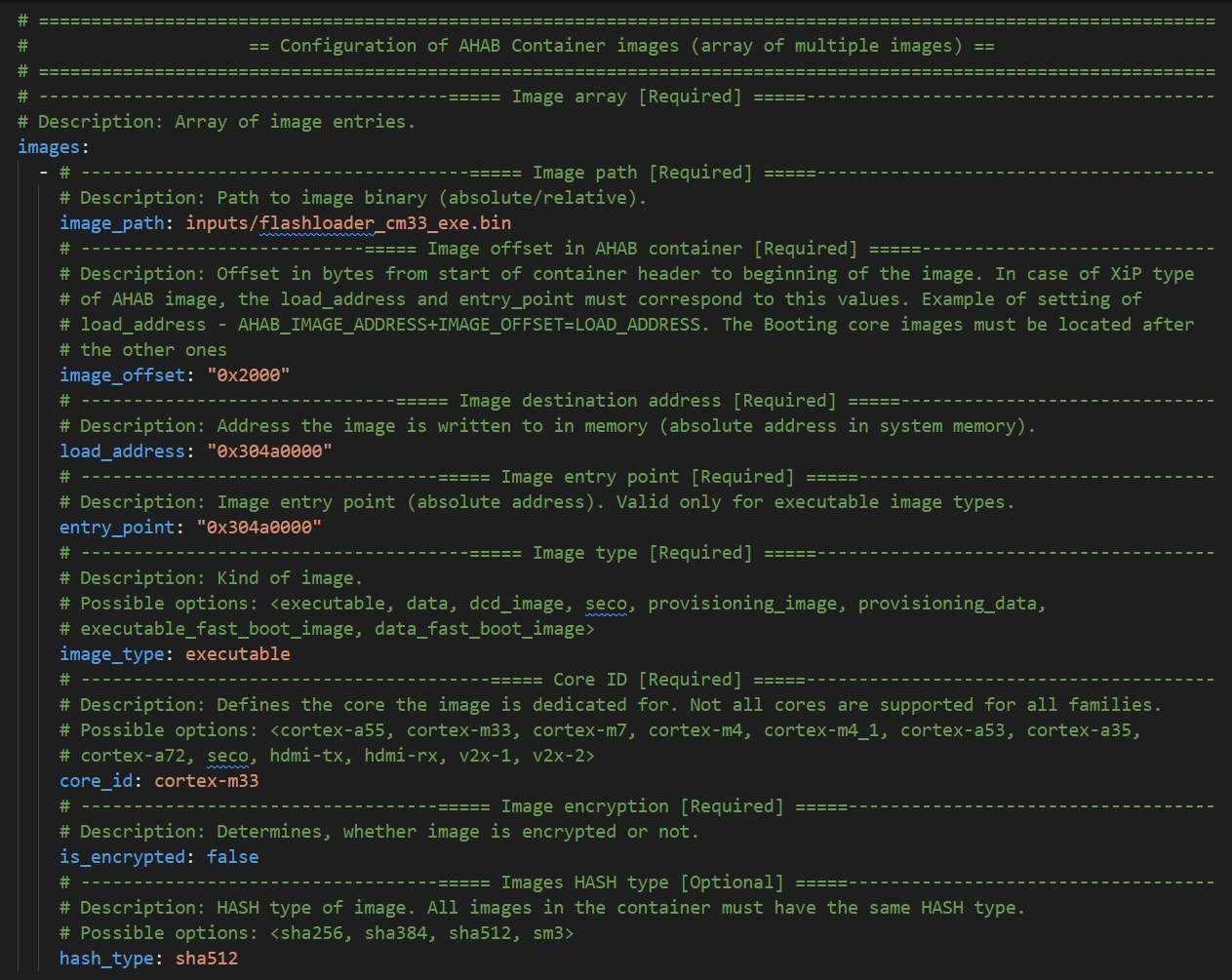
Define the image executable (compiled flashloader binary), On the offset doesn’t matter in serial downloader mode, it’s updated automatically. The most important are ‘load_address’ and ‘entry_point’ fields that must be sets on same value as is defined linker file for the application start of the application. The unused optionally fields has been removed from config. In case of i.MXRT118x the linker load address is 0x304a0000.
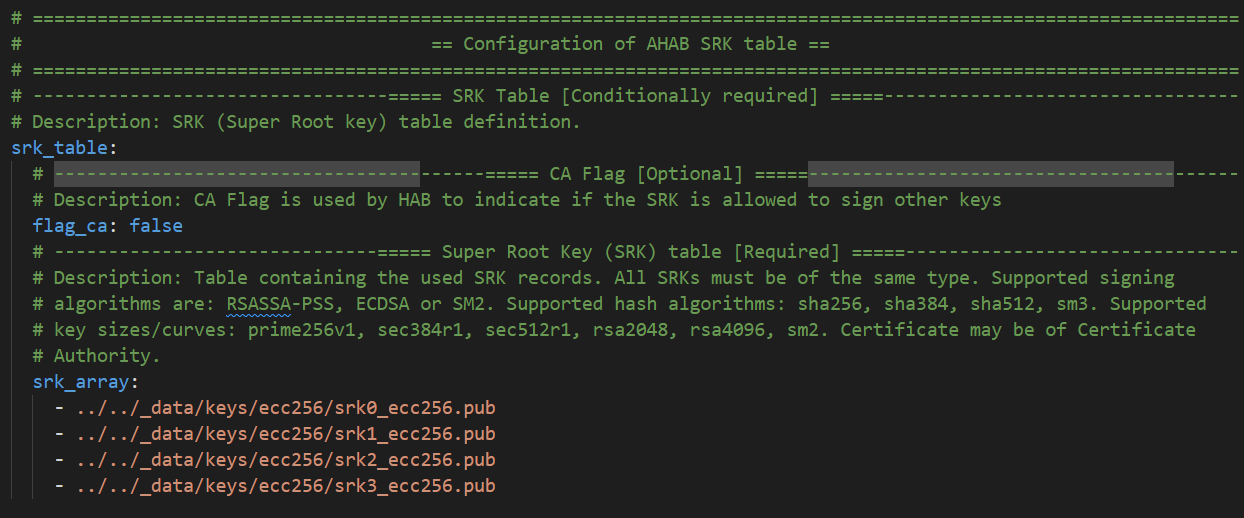
Define the SRK (Super Root Keys) record. In our case the local pregenerated public keys. If you do not have SRK and need to generate it, you can get inspired here How-to-get-keys-using-nxpcrypto.
And finally remove unused parts for AHAB Certificate and Encryption blob
3. Export the AHAB container#
To export AHAB container is designed SPSDK tool in ‘nxpimage’ under ‘ahab’ sub commands group.
# Export AHAB container using nxpimage
%! nxpimage $VERBOSITY ahab export -c $AHAB_CONFIG

assert os.path.exists(AHAB_CONFIG)
nxpimage -v ahab export -c inputs/flashloader_cm33_cfg.yaml
INFO:spsdk.apps.nxpimage:Created AHAB Image:
Name:      AHAB Image
Starts:    0x0
Ends:      0x19cef
Size:      Size: 103.2 kiB; 105,712 B
Alignment: 8 B
Pattern:zeros
AHAB Image for mimxrt1189_b0

INFO:spsdk.apps.nxpimage:Created AHAB Image memory map:

+==0x0000_0000= AHAB Image =======================+
|           Size: 103.2 kiB; 105,712 B            |
|          AHAB Image for mimxrt1189_b0           |
|                 Pattern: zeros                  |
|+==0x0000_0000= AHAB Containers ================+|
||            Size: 8.0 kiB; 8,192 B             ||
||             AHAB Containers block             ||
||                Pattern: zeros                 ||
||+==0x0000_0000= AHAB Container 0 =============+||
|||                 Size: 544 B                 |||
|||       AHAB Container for nxp_SWver:0        |||
||+==0x0000_021f================================+||
||                  Gap: 480 B                   ||
||+==0x0000_0400= AHAB Container 1 =============+||
|||                 Size: 544 B                 |||
|||       AHAB Container for oem_SWver:0        |||
||+==0x0000_061f================================+||
|+==0x0000_1fff==================================+|
|+==0x0000_2000= Container 0 AHAB Data Image 0 ==+|
||            Size: 9.2 kiB; 9,456 B             ||
||AHAB encrypted data block for ele core and ele ||
||                  Image Type.                  ||
|+==0x0000_44ef==================================+|
|+==0x0000_44f0= Container 1 AHAB Data Image 0 ==+|
||           Size: 86.0 kiB; 88,064 B            ||
||    AHAB data block for cortex-m33 core and    ||
||            executable Image Type.             ||
|+==0x0001_9cef==================================+|
+==0x0001_9cef====================================+

Success. (AHAB: workspace\flashloader_cm33_ahab.bin created.)
Generated file containing SRK hash: workspace\flashloader_cm33_ahab_oem1_srk0_hash.txt
INFO:spsdk.image.ahab.utils:
Fuses info:

 --== Grouped register name: SRKH ==--
OTP ID: 128, Value: 0x74c72ccb
OTP ID: 129, Value: 0x92ecdcb2
OTP ID: 130, Value: 0xa0ec40c8
OTP ID: 131, Value: 0xf8786b64
OTP ID: 132, Value: 0x3a1d66d3
OTP ID: 133, Value: 0x5a26ed43
OTP ID: 134, Value: 0xac130a49
OTP ID: 135, Value: 0xa195ea7

Generated script for writing fuses for container 1: workspace\flashloader_cm33_ahab_oem1_srk0_hash_blhost.bcf
4. Make Bootable image#
To proper load of created flashloader over serial downloader mode, the bootable image must be created. In case of serial downloader the bootable image is composed from XMCD block (up to 1KB, 0x400B) and the AHAB image itself. The SPSDK contains commands group that simplify whole operation with bootable images under ‘nxpimage’. To list all supported subcommands call help for this subgroup:
# Get help for bootable image to list all supported commands
%! nxpimage bootable-image
nxpimage bootable-image
Usage: nxpimage bootable-image [OPTIONS] COMMAND [ARGS]...

  Group of bootable image utilities.

Options:
  --help  Show this message and exit.

Commands:
  fcb            FCB (Flash Configuration Block) utilities.
  get-families   Shows the full family info for commands in this group.
  get-templates  Create template of configurations in YAML format from...
  merge          Merge boot image blocks into one bootable image.
  parse          Parse Bootable Image into YAML configuration and binary...
  verify         Verify Bootable Image.
  xmcd           XMCD (External Memory Configuration Data) utilities.
As a good starting point it could be creation of Bootable Image configuration YAML file template#
# Get the template file of configuration for bootable image

%! nxpimage $VERBOSITY bootable-image get-templates -f mimxrt1189 -o $BIMG_TEMPLATES_PATH --force
nxpimage -v bootable-image get-templates -f mimxrt1189 -o workspace/bootable_image_templates --force
Creating workspace/bootable_image_templates/bootimg_mimxrt1189_serial_downloader.yaml template file.
Creating workspace/bootable_image_templates/bootimg_mimxrt1189_flexspi_nor.yaml template file.
Creating workspace/bootable_image_templates/bootimg_mimxrt1189_flexspi_nand.yaml template file.
Creating workspace/bootable_image_templates/bootimg_mimxrt1189_semc_nand.yaml template file.
Creating workspace/bootable_image_templates/bootimg_mimxrt1189_emmc.yaml template file.
Creating workspace/bootable_image_templates/bootimg_mimxrt1189_sd.yaml template file.
From the Bootable image templates folder copy and modify the ‘bootimg_rt118x_serial_downloader.yaml’ file. In our case we have to solve just two options:
Remove XMCD block section from configuration file (no custom XMCD will be used)
Modify the AHAB container file name
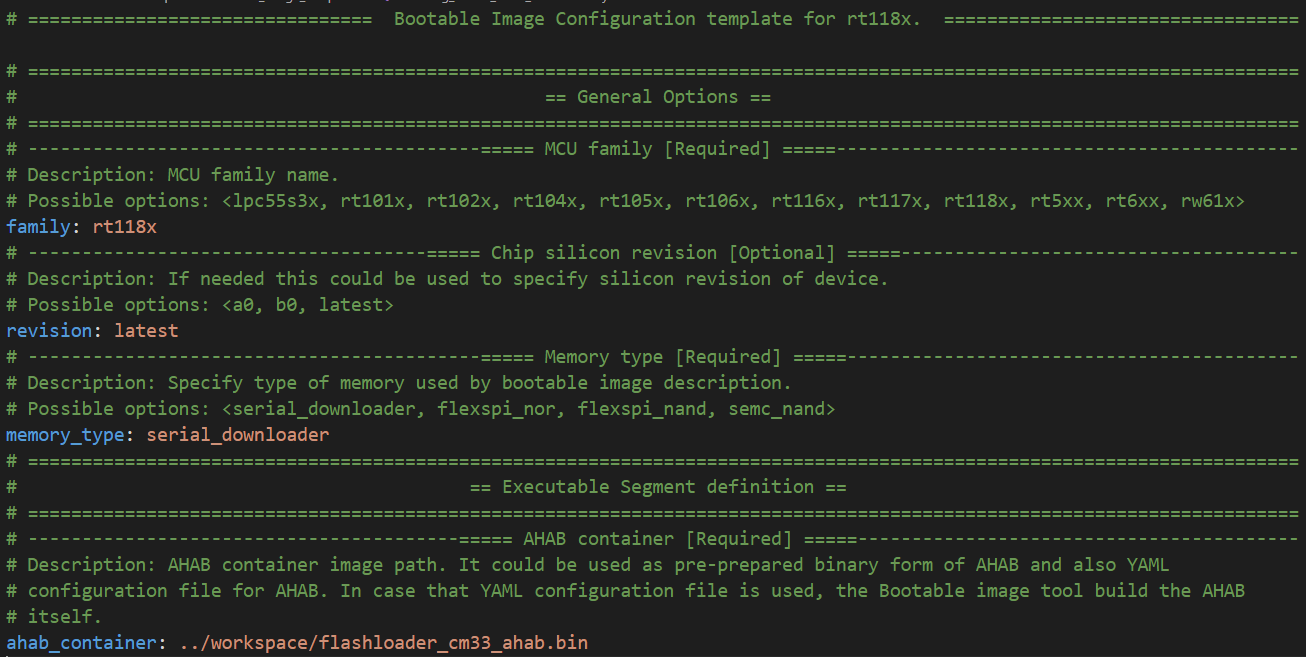
Export the final bootable image#
# Export bootable image

%! nxpimage $VERBOSITY bootable-image merge -c $BOOTIMG_CONFIG -o $FLASHLOADER

assert os.path.exists(FLASHLOADER)
nxpimage -v bootable-image merge -c inputs/bootimg_rt118x_serial_downloader.yaml -o workspace/flashloader.bin
INFO:spsdk.apps.nxpimage:Created Bootable Image:
Name:      Bootable Image for mimxrt1189
Starts:    0x0
Ends:      0x1a0ef
Size:      Size: 104.2 kiB; 106,736 B
Alignment: 1 B
Pattern:zeros
Memory type: MemoryType.SERIAL_DOWNLOADER
Revision: latest

INFO:spsdk.apps.nxpimage:Created Bootable Image memory map:

+==0x0000_0000= Bootable Image for mimxrt1189 ==+
|          Size: 104.2 kiB; 106,736 B           |
|   Memory type: MemoryType.SERIAL_DOWNLOADER   |
|               Revision: latest                |
|                Pattern: zeros                 |
|                 Gap: 1.0 kiB                  |
|+==0x0000_0400= ahab_container ===============+|
||         Size: 103.2 kiB; 105,712 B          ||
|+==0x0001_a0ef================================+|
+==0x0001_a0ef==================================+

Success. (Bootable Image: workspace\flashloader.bin created)
5. Generated flashloader file load to i.MXRT118x#
As a final step is load flashloader into MCU and run. The easiest way is get ‘blhost’ application and ‘load-image’ command.
Chip must be in serial downloader mode!
Here is two examples how to do it over Serial line or USB:
blhost -p com1 load-image workspace/flashloader.binblhost -u 0x1fc9:0x014c load-image workspace/flashloader.bin