
RW61x Debug Authentication#
Introduction#
This jupyter notebook describes the steps for debug authentication (DAT) using the nxpdebugmbox app away from SPSDK team. The fundamental principles of debugging conflict with the principles of security: debugging requires access to the system state and system information, security requires the restriction of access to assets. Often, debug access is disabled completely before the products are deployed. This causes challenges for product design teams to complete the return material analysis. To address these challenges, the device supports a DAT protocol as a mechanism to authenticate the debugger. The product manufacturer approves the credentials before granting debug access to the device. So DAT is a key feature as it enables security during the complete lifecycle of a product.
An example for implementing DAT has already been presented for MCXN9xx devices, so you can study the general principles of DAT from mcxn9xx_debug_auth.ipynb. The reason for creating this jupyter notebook was the numerous inquiries regarding the use of DAT on rw612 devices, considering the necessary configuration of registers, which MCXN9xx does not have, and the procedure was therefore not entirely clear to some users.
Let’s prepare the environment#
%run ../../init_notebook.ipynb

import os

WORKSPACE = "workspace/"  # change this to path to your workspace
KEYS = "../../_data/keys/ecc256/"  # change this to path to your keys
INPUTS = "inputs/"

# choose debug interface
INTERFACE = "pyocd"
# choose family
FAMILY = "rw612"
env: JUPYTER_SPSDK=1
Created `%!` as an alias for `%execute`.
Generate root of trust keys and debug credential key#
Root of Trust Keys (RoTKs)
The device supports up to four RoTKs. At least one key pair is required.
Supported key types: secp256r1, secp384r1.
Debug Credential key (DCK)
The public part of the key is associated with a debug credential (DC).
The private part is held by the user and used to produce signatures during authentication.
In this example, we will use nxpcrypto app to generate secp256r1 keys
# load generated key pair for ROTK0
ROTK0_PRIVATE_KEY_PATH = os.path.join(KEYS, "srk0_ecc256.pem")
ROTK0_PUBLIC_KEY_PATH = os.path.join(KEYS, "srk0_ecc256.pub")
# verify that keys were loaded
assert os.path.exists(ROTK0_PRIVATE_KEY_PATH)
assert os.path.exists(ROTK0_PUBLIC_KEY_PATH)

# load generated key pair for DCK
DCK_PRIVATE_KEY_PATH = os.path.join(KEYS, "dck_ecc256.pem")
DCK_PUBLIC_KEY_PATH = os.path.join(KEYS, "dck_ecc256.pub")
# verify that keys were loaded
assert os.path.exists(DCK_PRIVATE_KEY_PATH)
assert os.path.exists(DCK_PUBLIC_KEY_PATH)
Generate debug credential file#
Debug Credential (DC) configuration including:
socc: Specifies the device family.
uuid: Universally Unique Identifier (UUID) is 128-bit IETF RFC4122 compliant. Controls whether to enforce UUID check during DC validation or not. If this field is set, only the DC with matching device UUID can unlock the debug access.
cc_socu: SoC Usage controls which debug domains are accessed via the authentication protocol.
cc_vu: Vendor Usage can be leveraged by vendors in product-specific ways.
cc_beacon: Credential beacon is associated with DC and system product. With credential beacon, debug authentication can be restricted to specific parts having matching system product ID in OTP.
rot_meta: Includes public parts of RoT key(s).
rot_id: Defines the root of trust identifier. Allows the debugger to infer which RoT public key(s) are acceptable to the device. The rot_id field is used. to bind the devices to specific certificate authority (CA) keys issuing the debug credentials.
dck: The public part of DCK.
rotk: RoT signature private key for the RoT meta chosen by rot_id to sign the image.
sign_provider: Signature provider configuration in format
type=<sp_type>;<key_number>=<rot_id>.
# generate and modify DC config
DC_CONFIG_DEFAULT_RW61X = os.path.join(WORKSPACE, "dc_config_default_rw61x.yml")

%! nxpdebugmbox -f $FAMILY dat dc get-template -o $DC_CONFIG_DEFAULT_RW61X --force
nxpdebugmbox -f rw612 dat dc get-template -o workspace/dc_config_default_rw61x.yml --force
The Debug Credentials template for rw612 has been saved into workspace\dc_config_default_rw61x.yml YAML file
DC_CONFIG_RW61X = os.path.join(INPUTS, "dc_config_rw61x.yml")
os.path.exists(DC_CONFIG_RW61X)
True
In our case, we modified these items in the DC configuration template:
Specify cc_socu that controls which debug domains are accessed via the authentication protocol.

Define path to the generated RoTK/SRK.

Define which RoTK will be the root of trust identifier <0, 1, 2, 3>.

Define path to the DCK.

Define path to the ROTK. RoT signature private key for the RoT meta chosen by rot_id to sign the image.

NOTICE: Based on the chip revision choose socc. A1: socc = 0x4; A2: socc = 0xA!
# generate DC file according to exemplary config
DC_FILE_RW61X = os.path.join(WORKSPACE, "rw61x.dc")

%! nxpdebugmbox -f $FAMILY dat dc export -c $DC_CONFIG_RW61X -o $DC_FILE_RW61X --force

# save RKTH
RKTH_PATH = os.path.join(WORKSPACE, "rkth.txt")

%! nxpcrypto rot calculate-hash -f $FAMILY -k $ROTK0_PUBLIC_KEY_PATH -o $RKTH_PATH

# read RKTH
with open(RKTH_PATH, "rb") as rkth:
    rkth_val = f"0x{rkth.read().hex()}"
nxpdebugmbox -f rw612 dat dc export -c inputs/dc_config_rw61x.yml -o workspace/rw61x.dc --force
RKTH: dc41dd48d79b99ac8b91194483fc477c632d0b5632ae8a439476a98872971d3d
Creating Debug credential file succeeded
Device preparation#
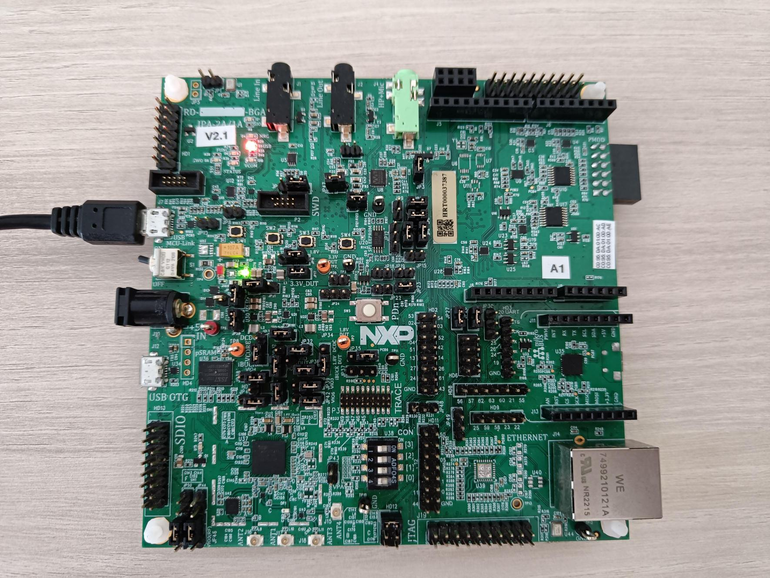
In chip MUST be loaded signed application to show capability of DAT in real application.. To achieve that we do those steps:
Go to ISP mode using nxpdebugmbox utility
Create signed MBI with matching keys used in example
Create Bootable image with generated example and FCB block
Load the created image into chip flash
# force device to ISP mode
%! nxpdebugmbox -i $INTERFACE -f $FAMILY cmd ispmode -m 1
# check if the device is connected and detected by PC
%! nxpdevscan
nxpdebugmbox -f rw612 cmd ispmode -m 1
  #   Interface   Id           Description
-------------------------------------------------------
  0   PyOCD       1064263226   Segger J-Link MCU-Link
Entering into ISP mode succeeded
nxpdevscan
-------- Connected NXP USB Devices --------

-------- Connected NXP UART Devices --------

Port: COM115
Type: mboot device

-------- Connected NXP SIO Devices --------

-------- Connected NXP UUU Devices --------
# determine the interface connection based on the result from nxpdevscan
UART = "-p COM115"
# Create MBI
%! nxpimage mbi export -c inputs/rw61x_xip_signed.yaml
# Merge MBI and FCB to bootable image
%! nxpimage bootable-image merge -c inputs/bootimg_rw61x_flexspi_nor.yaml -o workspace/outputs/bootable_image.bin
# Load it into flash
# Memory configuration
%! nxpmemcfg parse --family rw612 --force --peripheral flexspi_nor --option-word 0xC0000008 --output workspace/outputs/mem_cfg.yaml
%! nxpmemcfg blhost-script --force --config workspace/outputs/mem_cfg.yaml --output workspace/outputs/script.txt
%! blhost $UART batch workspace/outputs/script.txt

# Erase memory
%! blhost $UART flash-erase-region 0x08000000 0x10000
# Write
%! blhost $UART write-memory 0x08000000 workspace/outputs/bootable_image.bin
nxpimage mbi export -c inputs/rw61x_xip_signed.yaml
RKTH: dc41dd48d79b99ac8b91194483fc477c632d0b5632ae8a439476a98872971d3d
Success. (Master Boot Image: workspace\outputs\mbi.bin created.)
nxpimage bootable-image merge -c inputs/bootimg_rw61x_flexspi_nor.yaml -o workspace/outputs/bootable_image.bin
Success. (Bootable Image: workspace\outputs\bootable_image.bin created)
nxpmemcfg parse --family rw612 --force --peripheral flexspi_nor --option-word 0xC0000008 --output workspace/outputs/mem_cfg.yaml
Parsed option words has been stored: workspace/outputs/mem_cfg.yaml
nxpmemcfg blhost-script --force --config workspace/outputs/mem_cfg.yaml --output workspace/outputs/script.txt
Exported blhost script.
blhost -p COM115 batch workspace/outputs/script.txt
Response status = 0 (0x0) Success.
Response status = 0 (0x0) Success.
blhost -p COM115 flash-erase-region 0x08000000 0x10000
Response status = 0 (0x0) Success.
blhost -p COM115 write-memory 0x08000000 workspace/outputs/bootable_image.bin
Writing memory
Response status = 0 (0x0) Success.
Response word 1 = 22644 (0x5874)
Shadow registers configuration#
The following is an introduction to one of the variants of the shadow register configuration for DAT. The illustrative use case that is presented is based on disabling the debug access control registers.
The debug access control rights and security policies are configurable.
The configuration fields are referred to as device configuration for credential constraints (DCFG_CC).
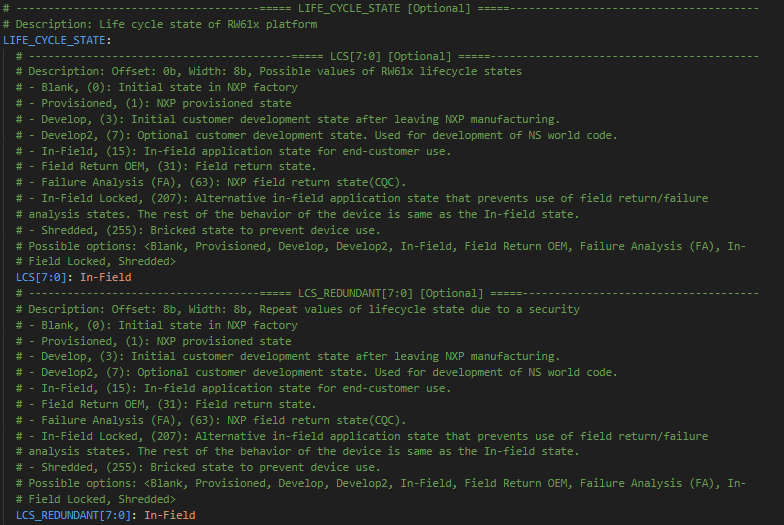
Life Cycle (LC) state in shadow registers to be configured should be either Develop2 (0x0707) or In-Field (0x0F0F).
The RKTH value must be specified.
At the end of this chapter there is test of access to chip memory, that should ends without guaranteed access, because chip is running signed application and debug access is disabled.
# generate and modify shadowregs config
SR_TEMPLATE_DEFAULT_PATH = os.path.join(WORKSPACE, "sr_template_default_rw61x.yml")

%! shadowregs -f $FAMILY get-template -o $SR_TEMPLATE_DEFAULT_PATH --force
shadowregs -f rw612 get-template -o workspace/sr_template_default_rw61x.yml --force
The Shadow registers template for rw612 has been saved into workspace\sr_template_default_rw61x.yml YAML file
SR_TEMPLATE_PATH = os.path.join(INPUTS, "sr_template_rw61x.yml")
os.path.exists(SR_TEMPLATE_PATH)
True
In our case, we modified these items in the SR configuration template:
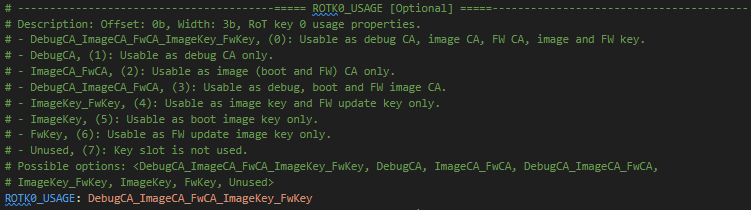
Set ROTKx_USAGE where x is index of RoTKs in the BOOT_CFG3 register based on how many keys you are using.



Move the life cycle state to In-Field.
# load modified shadowregs
%! shadowregs -i $INTERFACE -f $FAMILY loadconfig -c $SR_TEMPLATE_PATH --no-verify
# RKTH specification
%! shadowregs -i $INTERFACE -f $FAMILY setreg -r RKTH -v $rkth_val
# reset the device to load modified shadowregs
%! shadowregs -i $INTERFACE -f $FAMILY reset

# check the device is not accessible for debugging
%! nxpdebugmbox -f $FAMILY -i $INTERFACE mem-tool test-connection
shadowregs -i pyocd -f rw612 loadconfig -c inputs/sr_template_rw61x.yml --no-verify
  #   Interface   Id           Description
-------------------------------------------------------
  0   PyOCD       1064263226   Segger J-Link MCU-Link
The Shadow registers has been loaded by configuration in inputs/sr_template_rw61x.yml YAML file
shadowregs -i pyocd -f rw612 setreg -r RKTH -v 0xdc41dd48d79b99ac8b91194483fc477c632d0b5632ae8a439476a98872971d3d
  #   Interface   Id           Description
-------------------------------------------------------
  0   PyOCD       1064263226   Segger J-Link MCU-Link
WARNING:spsdk.apps.shadowregs:Verification is not possible on the rw612, it won't be performed. (3146ms since start, shadowregs.py:314)
The Shadow register RKTH has been set to 0xdc41dd48d79b99ac8b91194483fc477c632d0b5632ae8a439476a98872971d3d value
shadowregs -i pyocd -f rw612 reset
  #   Interface   Id           Description
-------------------------------------------------------
  0   PyOCD       1064263226   Segger J-Link MCU-Link
The target has been reset.
nxpdebugmbox -f rw612 -i pyocd mem-tool test-connection
  #   Interface   Id           Description
-------------------------------------------------------
  0   PyOCD       1064263226   Segger J-Link MCU-Link
The device is not-accessible for debugging.
Debug authentication challenge#
In the previous steps, we loaded a configuration with all the keys and enabled the debug authentication in the device. We have also created the DC certificate and private key for the debug authentication challenge. In addition, a protocol version and a beacon must be specified.
RW61x devices support two versions of ECDSA keys:
ECDSA P-256 signature verification RoT key(s)
ECDSA P-384 signature verification RoT key(s)
The debug authentication process can be extended with beacons. The authentication beacon defines the system-specific debug policy use case such as: restricting debug authentication to only certain devices having specific system product ID during manufacturing phase.
We need to create a template for configuration for DAT.
DAT_CONFIG_DEFAULT_RW61X = os.path.join(WORKSPACE, "dat_config_default_rw61x.yml")
%! nxpdebugmbox -f $FAMILY dat get-template -o $DAT_CONFIG_DEFAULT_RW61X --force
nxpdebugmbox -f rw612 dat get-template -o workspace/dat_config_default_rw61x.yml --force
Creating workspace\dat_config_default_rw61x.yml template file.
DAT_CONFIG = INPUTS + "dat_config_rw61x.yml"
%! nxpdebugmbox -v -f $FAMILY -i $INTERFACE dat auth -c $DAT_CONFIG
nxpdebugmbox -v -f rw612 -i pyocd dat auth -c inputs/dat_config_rw61x.yml
INFO:spsdk.apps.nxpdebugmbox:Starting Debug Authentication
  #   Interface   Id           Description
-------------------------------------------------------
  0   PyOCD       1064263226   Segger J-Link MCU-Link
INFO:spsdk.debuggers.debug_probe_pyocd:PyOCD connected via J-Link MCU-Link probe.
INFO:spsdk.apps.nxpdebugmbox:DAC:
Version                : Version 2.0
SOCC                   : 0x0000000A
UUID                   : 38BA14AA5C6B44799B06289017A5CDF9
CC_VU                  : 0
ROTID_rkh_revocation   : E9C65090
ROTID_rkth_hash        : dbfd36837c0ebe31e7fd8d861a20b4f7b3b7b013710465f95aa9518397507ea9
CC_soc_pinned          : 00000100
CC_soc_default         : 00000000
Challenge              : 3d96b97767b9fd1312383563b945d78ba51c6d4bd7224cc8257263043b6a9d48

INFO:spsdk.apps.nxpdebugmbox:DAR:
DAC:
Version                : Version 2.0
SOCC                   : 0x0000000A
UUID                   : 38BA14AA5C6B44799B06289017A5CDF9
CC_VU                  : 0
ROTID_rkh_revocation   : E9C65090
ROTID_rkth_hash        : dbfd36837c0ebe31e7fd8d861a20b4f7b3b7b013710465f95aa9518397507ea9
CC_soc_pinned          : 00000100
CC_soc_default         : 00000000
Challenge              : 3d96b97767b9fd1312383563b945d78ba51c6d4bd7224cc8257263043b6a9d48

DC:
Version : Version 2.0
SOCC    : 0x0000000A
UUID    : 00000000000000000000000000000000
CC_SOCC : 0xfff
CC_VU   : 0x0
BEACON  : 0
Number of records in flags: 1
CRTK table not present
CTRK hash   : dc41dd48d79b99ac8b91194483fc477c632d0b5632ae8a439476a98872971d3d

Authentication Beacon: 0

INFO:spsdk.debuggers.debug_probe_pyocd:PyOCD connected via J-Link MCU-Link probe.
Debug Authentication ends successfully.
# check the device is accessible for debugging
%! nxpdebugmbox -f $FAMILY -i $INTERFACE mem-tool test-connection
nxpdebugmbox -f rw612 -i pyocd mem-tool test-connection
  #   Interface   Id           Description
-------------------------------------------------------
  0   PyOCD       1064263226   Segger J-Link MCU-Link
The device is accessible for debugging.