
RW61x Shadow Registers#
Introduction#
The NXP tool, shadowregs (see User Guide), control your OTP fuses during development or testing. It enables the creation of “copies” of OTP fuses in the form of shadow registers. After each power-on reset, these shadow registers are cleared, and the default OTP fuses are loaded. It’s important to note two small limitations: the device must be in a lifecycle that supports shadow registers, and certain registers are not included in shadow registers.
Supported Commands#
fuses-script - Generate BLHOST script to burn up fuses in device by configuration.
get-template - Generate the template of Shadow registers YAML configuration file.
getreg - Print the current value of one shadow register.
loadconfig - Load new state of shadow registers from YAML file into micro controller.
printregs - Print all Shadow registers including theirs current values.
reset - Reset connected device.
saveconfig - Save current state of shadow registers to YAML file.
setreg - The command sets a value of one shadow register defined by parameter.
Let’s prepare the environment#
%run ../../init_notebook.ipynb

import os

WORKSPACE = "workspace/"  # change this to path to your workspace
INPUTS = "inputs/"

# choose debug interface
INTERFACE = "pyocd"
# family
FAMILY = "rw612"
env: JUPYTER_SPSDK=1
Created `%!` as an alias for `%execute`.
Device preparation#
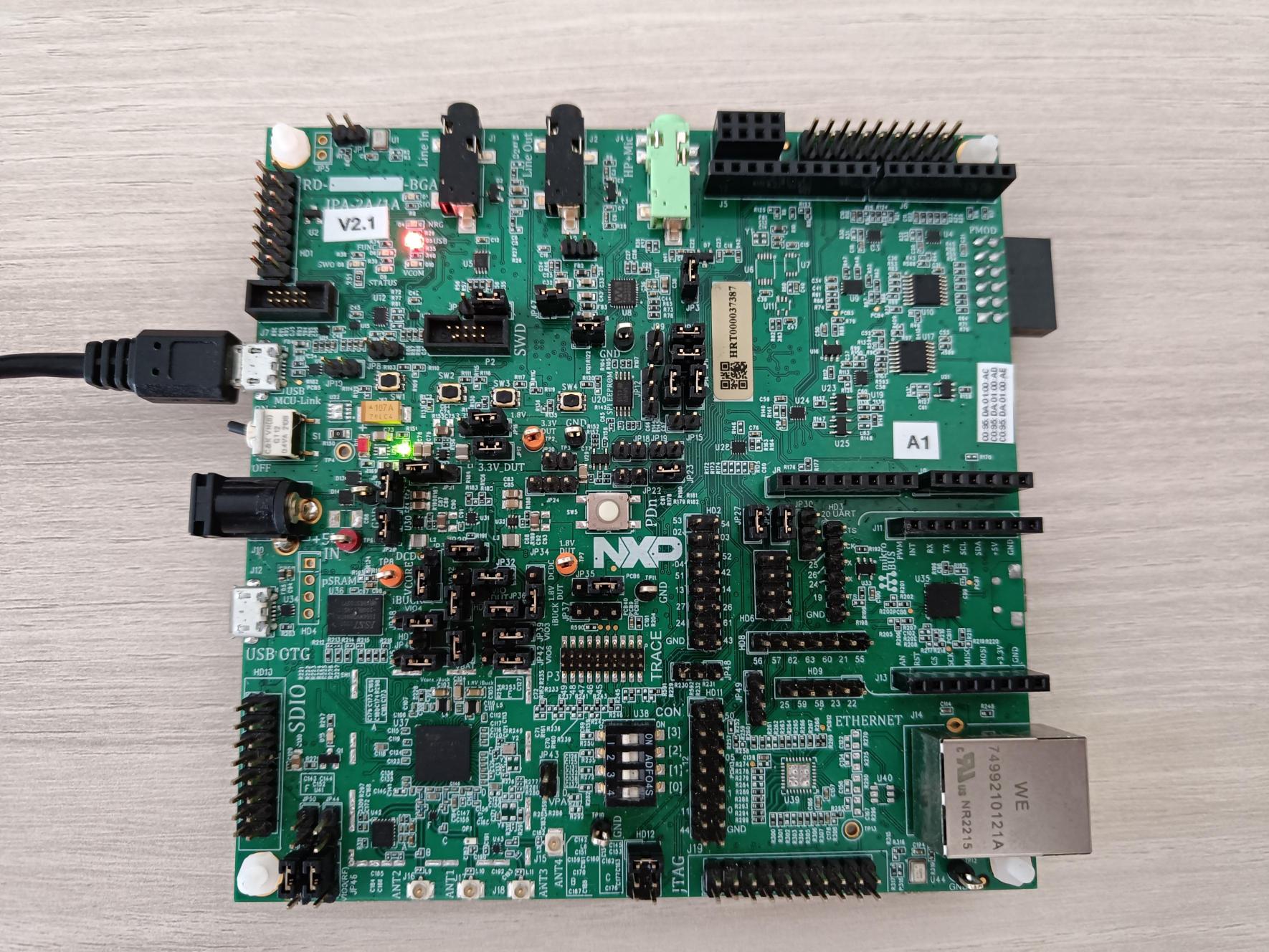
Have the device in debug mode.
# check availability of debug probe
%! nxpdebugmbox -f $FAMILY -i $INTERFACE mem-tool test-connection
nxpdebugmbox -f rw612 -i pyocd mem-tool test-connection
  #   Interface   Id           Description
-------------------------------------------------------
  0   PyOCD       1064263226   Segger J-Link MCU-Link
The device is accessible for debugging.
Compare the current state of shadowregs with defaults#
Verify that your shadow registers are in the default state.
# save differences comparing to defaults
SR_DIFF_PATH = os.path.join(WORKSPACE, "sr_diff_rw61x.yml")

%! shadowregs -i $INTERFACE -f $FAMILY saveconfig -o $SR_DIFF_PATH -d
shadowregs -i pyocd -f rw612 saveconfig -o workspace/sr_diff_rw61x.yml -d
  #   Interface   Id           Description
-------------------------------------------------------
  0   PyOCD       1068491324   Segger J-Link MCU-Link
The Shadow registers has been saved into workspace/sr_diff_rw61x.yml YAML file
# optional but recommended: reset connected device
%! shadowregs -i $INTERFACE -f $FAMILY reset
shadowregs -i pyocd -f rw612 reset
  #   Interface   Id           Description
-------------------------------------------------------
  0   PyOCD       1064263226   Segger J-Link MCU-Link
The target has been reset.
Generate shadowregs template#
# generate the template of shadow registers
SR_TEMPLATE_DEFAULT_PATH = os.path.join(WORKSPACE, "sr_template_default_rw61x.yml")
%! shadowregs -f $FAMILY get-template -o $SR_TEMPLATE_DEFAULT_PATH --force
assert os.path.exists(SR_TEMPLATE_DEFAULT_PATH)
shadowregs -f rw612 get-template -o workspace/sr_template_default_rw61x.yml --force
The Shadow registers template for rw612 has been saved into workspace\sr_template_default_rw61x.yml YAML file
Prepare shadowregs for dual boot#
In this section, one of the possible use cases of shadow registers will be presented.
Dual boot is normally not possible on RW61x devices without configuring the registers.
Dual boot represents the possibility to write two images and always boot the image that has the higher image version.
NOTICE: Switch the device to ISP mode (U38: OFF OFF OFF ON)!
SR_TEMPLATE_PATH = os.path.join(INPUTS, "sr_template_rw61x.yml")
assert os.path.exists(SR_TEMPLATE_PATH)
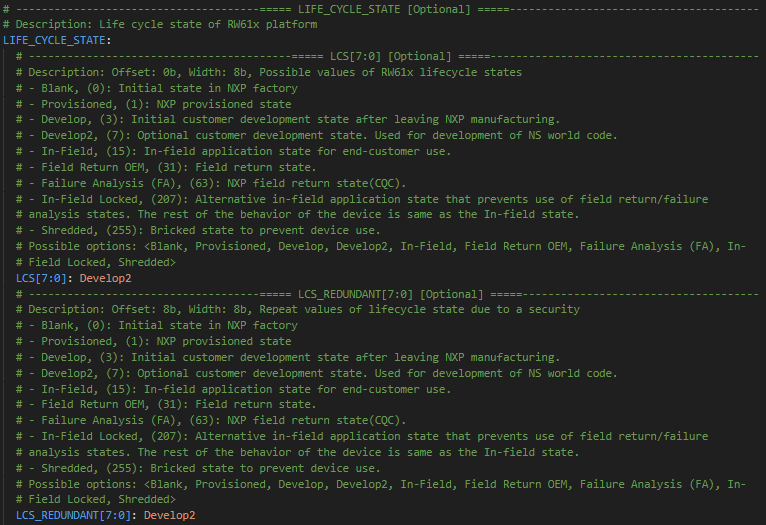
In our case, we modified these items in the shadow register configuration template:
Choose Flex-SPI flash such as the primary boot source.
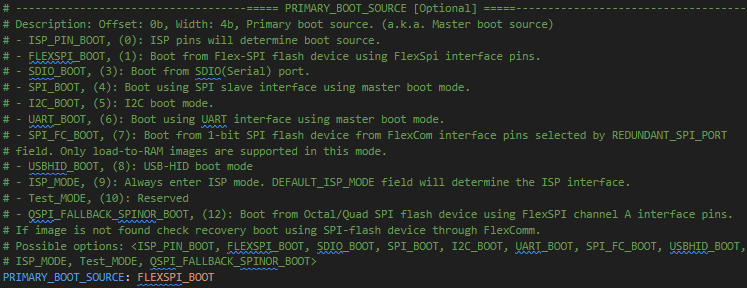
Disable the DICE computation.

Set the image offset.

Move the life cycle state to Develop2.
# list available connected devices
%! nxpdevscan
nxpdevscan
-------- Connected NXP USB Devices --------

-------- Connected NXP UART Devices --------

Port: COM12
Type: mboot device

-------- Connected NXP SIO Devices --------

-------- Connected NXP UUU Devices --------
# choose com port for rw612
UART_CONNECTION = "-p com12"
# memory configuration
FCB_PATH = os.path.join(INPUTS, "converted_fcb.bin")

frdm_board = 1  # in case you are not using RW61x FRDM board, set the variable to 0

if frdm_board:
    %! blhost $UART_CONNECTION fill-memory 0x2000F000 0x4 0xC0000008
else:
    %! blhost $UART_CONNECTION fill-memory 0x2000F000 0x4 0xC0100008
%! blhost $UART_CONNECTION configure-memory 9 0x2000F000
%! blhost $UART_CONNECTION flash-erase-region 0x08000000 0x10000
%! blhost $UART_CONNECTION flash-erase-region 0x08040000 0x10000
%! blhost $UART_CONNECTION fill-memory 0x20001000 4 0xF000000F
%! blhost $UART_CONNECTION configure-memory 9 0x20001000
blhost -p com12 fill-memory 0x2000F000 0x4 0xC0000008
Response status = 0 (0x0) Success.
blhost -p com12 configure-memory 9 0x2000F000
Response status = 0 (0x0) Success.
blhost -p com12 flash-erase-region 0x08000000 0x10000
Response status = 0 (0x0) Success.
blhost -p com12 flash-erase-region 0x08040000 0x10000
Response status = 0 (0x0) Success.
blhost -p com12 fill-memory 0x20001000 4 0xF000000F
Response status = 0 (0x0) Success.
blhost -p com12 configure-memory 9 0x20001000
Response status = 0 (0x0) Success.
# write images and versions
LED_BLINKY_PATH = os.path.join(INPUTS, "mbi_crc_led_blinky.bin")
HELLO_WORLD_PATH = os.path.join(INPUTS, "mbi_crc_hello_world.bin")
IMG_V0_PATH = os.path.join(INPUTS, "img_v0.bin")
IMG_V1_PATH = os.path.join(INPUTS, "img_v1.bin")

%! blhost $UART_CONNECTION write-memory 0x08000600 $IMG_V0_PATH
%! blhost $UART_CONNECTION write-memory 0x08001000 $LED_BLINKY_PATH

%! blhost $UART_CONNECTION write-memory 0x08040600 $IMG_V1_PATH
%! blhost $UART_CONNECTION write-memory 0x08041000 $HELLO_WORLD_PATH
blhost -p com12 write-memory 0x08000600 inputs/img_v0.bin
Writing memory
Response status = 0 (0x0) Success.
Response word 1 = 4 (0x4)
blhost -p com5 write-memory 0x08001000 inputs/mbi_crc_led_blinky.bin
Writing memory
Response status = 0 (0x0) Success.
Response word 1 = 14008 (0x36b8)
blhost -p com5 write-memory 0x08040600 inputs/img_v1.bin
Writing memory
Response status = 0 (0x0) Success.
Response word 1 = 4 (0x4)
blhost -p com5 write-memory 0x08041000 inputs/mbi_crc_hello_world.bin
Writing memory
Response status = 0 (0x0) Success.
Response word 1 = 22044 (0x561c)
# load modified shadowregs
%! shadowregs -i $INTERFACE -f $FAMILY loadconfig -c $SR_TEMPLATE_PATH
shadowregs -i pyocd -f rw612 loadconfig -c inputs/sr_template_rw61x.yml
  #   Interface   Id           Description
-------------------------------------------------------
  0   PyOCD       1068491324   Segger J-Link MCU-Link
WARNING:spsdk.apps.shadowregs:Verification is not possible on the rw612, it won't be performed. (9397ms since start, shadowregs.py:212)
The Shadow registers has been loaded by configuration in inputs/sr_template_rw61x.yml YAML file
# reset the device and run image
%! shadowregs -i $INTERFACE -f $FAMILY reset
shadowregs -i pyocd -f rw612 reset
  #   Interface   Id           Description
-------------------------------------------------------
  0   PyOCD       1068491324   Segger J-Link MCU-Link
The target has been reset.